
Cellwatch: Uploading New Config File:
1. Uploading New Config File;
2. There can only be one config so you’ll need to rename the current config to something like config.old, also you should see a history2025.his file, this also needs renamed to history2024.old then copy your new config.cfg from cellwatch or CPG to the directory.
A. Stop cellwatch and go to configuration.
B. Load configuration - password is deafcat.
C. Choose the new config file and restart cellwatch.
System will scan. Watch for errors.
The system will create a new log file overnight and we should see new data the next day.
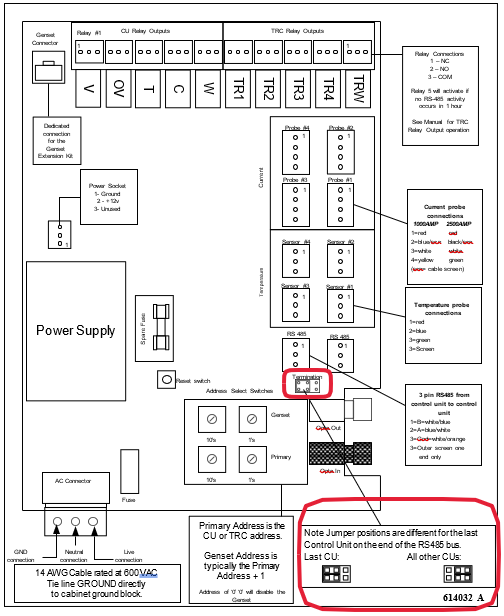
Also very important make sure the jumper is in the correct position on the last CU on the RS-485 bus. Unless you didn’t remove any CU’s then it should still be ok.
See below for CU image.
Was this article helpful?
That’s Great!
Thank you for your feedback
Sorry! We couldn't be helpful
Thank you for your feedback
Feedback sent
We appreciate your effort and will try to fix the article